Skip to content

Snap your plate, get the numbers

Take a photo of what you’re about to eat, or just describe it. MaklaFit AI estimates the calories, protein, carbs and fat, and you decide what goes in your diary.

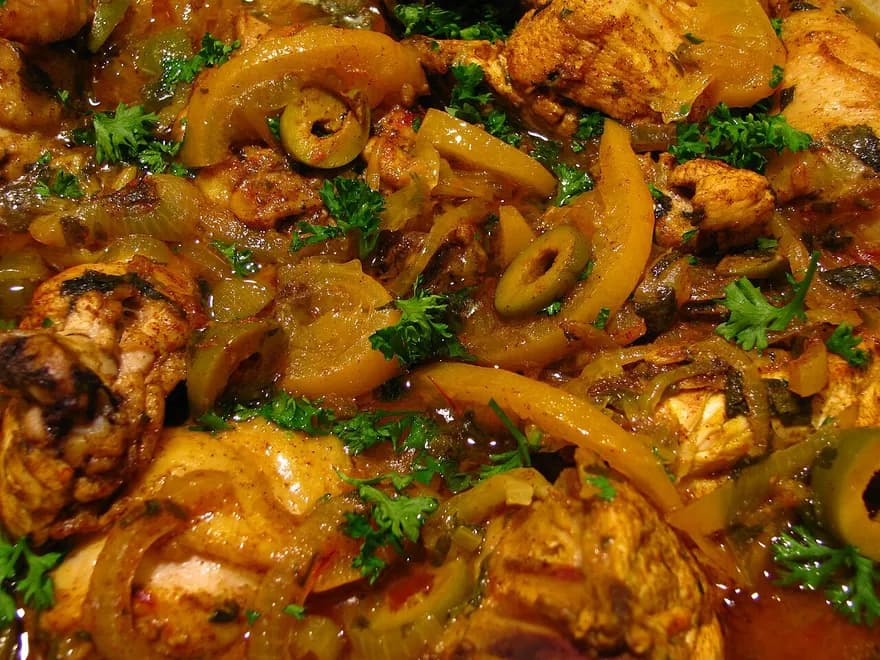
Photo of a chicken tagine, sent to MaklaFit AI

Lunch at my mother’s 😋

That looks like chicken tagine with olives and preserved lemon. For one helping (250 g), about:

375kcal
Protein
31.1 g
Carbs
7.5 g
Fat
24.3 g
Add to lunch

Example conversation. Figures from the MaklaFit catalog.

How it works

  1. Snap it or say it

    Take a photo of your plate, or type something like “a bowl of harira and two dates”.

  2. Check the estimate

    MaklaFit AI names the dish and estimates a helping’s calories, protein, carbs and fat. Estimates can be off, so give them a look.

  3. Add it to your day

    Pick the meal and it goes in your diary. Nothing is logged until you say so.

Ask it anything about food

It isn’t only for photos. Ask how many calories are in a plate of couscous, or what to eat after a workout, and get a straight answer.

  • Calories, protein, carbs and fat from one photo or one sentence
  • You check the estimate and pick the meal before anything is logged
  • Sees only what you send: never your profile, never your diary
  • One photo and one message to try it free; Pro adds 10 photos and 50 messages a day

It sees only what you send

When you press send, your photo or message goes to Google’s Gemini models and the estimate comes back to your phone. Your profile and diary are never sent, and Google doesn’t use the request to train its models. The chat stays on your phone until you delete it.
Free to try, more with Pro

  • Free: one photo and one message to try it, more for watching a short video
  • MaklaFit Pro: 10 photos and 50 messages every day, and no ads
Compare Free and Pro

Start with tonight’s dinner

Free on Google Play. No account: a few questions about you, and you’re in.

Get it onGoogle PlayiPhone version on its way